

Notepad++ has officially released version 8.9.2, and this update is not about new editing features or UI tweaks. Instead, it focuses entirely on strengthening the application’s update security after the previously disclosed hijacking incident that targeted its update mechanism. This release represents a serious hardening effort aimed at closing the weakest links in the distribution chain.
For users running Notepad++ through compatibility layers on Linux systems, especially those following our step-by-step guide on how to install Notepad++ in Ubuntu, this security improvement is particularly important. A secure update channel ensures that even cross-platform or Wine-based deployments remain protected against tampered update responses.
What Happened to the Old Update Mechanism?
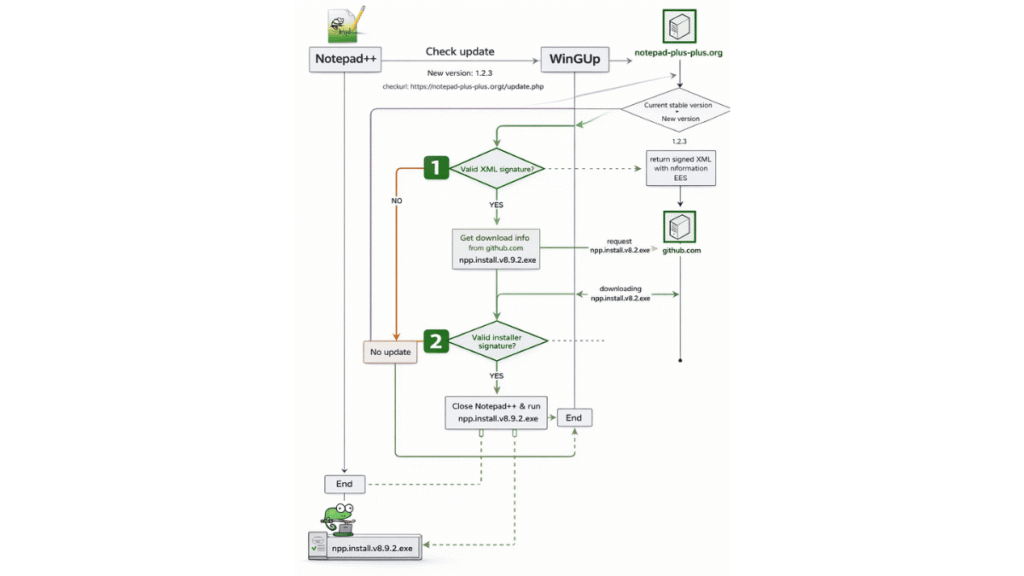
Previously, the update process worked in a straightforward way. Notepad++ would contact the official update server and retrieve an XML file containing version information and a download link. WinGUp, the built-in auto-updater, would then download the installer specified in that XML file and execute it.
The problem was not in the concept itself, but in the trust model. If the XML response or its delivery path was compromised, attackers could manipulate the download link and redirect selected users to a malicious binary. In some cases, only a very small percentage of users were targeted to avoid detection.
Double-Lock Security: Two Independent Verifications
With enhancements introduced in version 8.8.9 and fully enforced in 8.9.2, Notepad++ now implements a “double-lock” design. Two separate signature and certificate verifications are performed during the update process.
1. Signed XML Verification (Implemented in v8.9.2)
The XML returned by the official update server is now digitally signed using XMLDSig (XML Digital Signature). Before any update information is processed, the signature and certificate are verified.
- If the XML signature is valid, the process continues.
- If verification fails, the update is immediately aborted.
This prevents attackers from modifying version data or download URLs without breaking the signature validation.
2. Signed Installer Verification (Introduced in v8.8.9)
Even if the XML passes verification, a second layer of protection checks the downloaded installer’s digital signature. The binary must be properly signed and validated before execution.
- If the installer signature is valid, Notepad++ proceeds with the update.
- If the signature is invalid or missing, execution is blocked.
This dual verification model significantly reduces the attack surface and makes update hijacking through the previous technique practically unexploitable.
Additional Hardening in WinGUp
Beyond signature enforcement, WinGUp itself has been reinforced:
- The dependency on
libcurl.dllhas been removed to eliminate DLL side-loading risks. - Two insecure cURL SSL options —
CURLSSLOPT_ALLOW_BEASTandCURLSSLOPT_NO_REVOKE— have been removed. - Plugin management execution is now restricted to programs signed with the same certificate as WinGUp, effectively limiting execution to officially signed Notepad++ binaries.
Option to Disable the Auto-Updater
For enterprise environments or administrators who prefer manual control over software deployment, Notepad++ still allows the auto-updater component to be excluded during installation. When deploying via MSI, the following command disables the updater:
msiexec /i npp.8.9.2.Installer.x64.msi NOUPDATER=1A Security-Focused Release
Version 8.9.2 is not about new features. It is about rebuilding trust in the update pipeline. By combining signed XML verification with signed installer validation, Notepad++ has effectively introduced a layered defense model that closes the gap exploited in the past.
For all users, especially those who rely on automatic updates, upgrading to 8.9.2 is strongly recommended. This release marks a decisive shift toward a more resilient and tamper-resistant update infrastructure.